
Configuration
You can configure Bynder connection in Jahia using either a Settings Screen , a Karaf OSGI console configuration or a provisioning file.
Global Settings Screen
Section titled “Global Settings Screen”In the Bynder Configuration Settings Screen you will have :
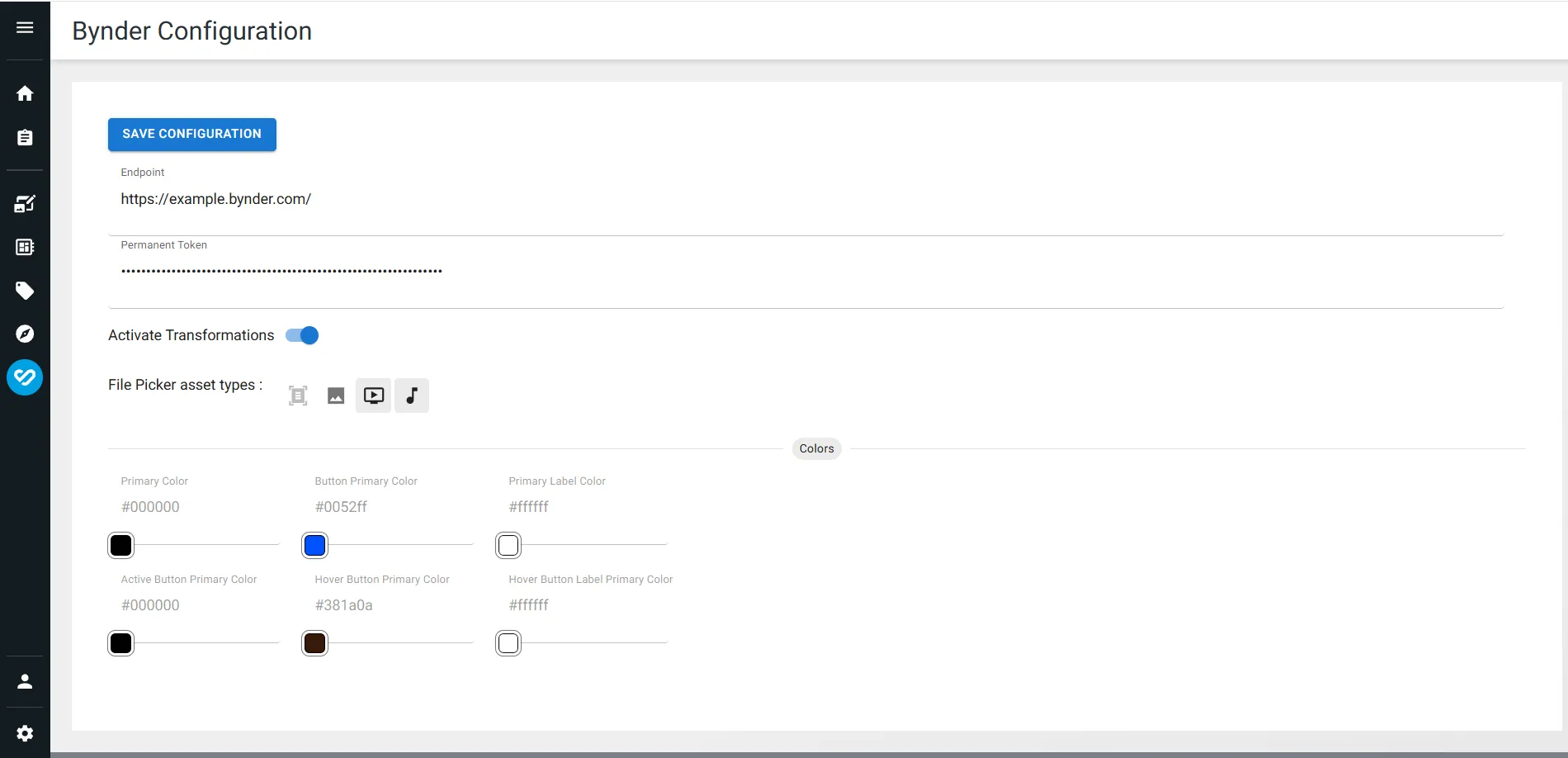
| Option | Type | Description |
|---|---|---|
Endpoint | String | Your Bynder endpoint |
Permanent Token | String | Your ReadOnly Bynder Permanent Token |
Activate Transformations | Boolean | To Activate Transformations or not |
File Picker Asset Types | List | List of Asset Types configured with File Picker (Document by default) |
Button Colors | String[] | Colors of Bynder Universal Compact View Modal |
Karaf OSGI Console
Section titled “Karaf OSGI Console”- Access to https://yourServer/tools/osgi/console/configMgr
- Search for
org.gladtek.jahia.modules.bynder_picker - Click on that entry you found
- Start editing values
| Option | Value |
|---|---|
bynder_colors.colorButtonPrimary | #599e39 |
bynder_colors.colorButtonPrimaryActive | #000000 |
bynder_colors.colorButtonPrimaryHover | #381a0a |
bynder_colors.colorButtonPrimaryHoverLabel | #ffffff |
bynder_colors.colorButtonPrimaryLabel | #ffffff |
bynder_colors.colorPrimary | #000000 |
bynder_provider.endpoint | https://example.com/ |
bynder_provider.fileAssetTypes | DOCUMENT,IMAGE,VIDEO,AUDIO |
bynder_provider.token | exampleToken |
bynder_provider.transformationsActive | true |
Edit Configuration
Section titled “Edit Configuration”Jahia provisioning file
Section titled “Jahia provisioning file”bynder-provisioning.yaml
Section titled “bynder-provisioning.yaml”# Configure Bynder- editConfiguration: "org.gladtek.jahia.modules.bynder_picker" configIdentifier: "global" properties: bynder_provider.endpoint: "https://example.bynder.com/" bynder_provider.token: "exampleSecretToken" bynder_provider.transformationsActive: "true" bynder_provider.fileAssetTypes: "DOCUMENT"- karafCommand: "log:log 'Bynder configured'"